
Level Smart Lock Review: Is It Worth It in 2026?
Level Smart Lock Review: Is It Worth It in 2026?
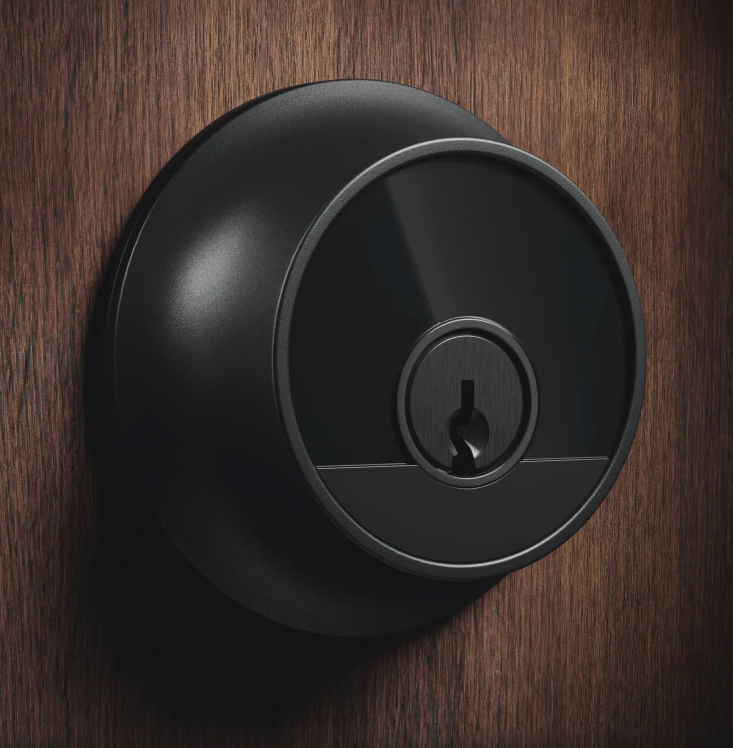
Most smart locks still look like a bulky computer strapped to your front door. Back in 2024, we accepted these massive plastic blocks as the unavoidable price of convenience. Today, the Level Lock remains the only major player that hides its technology so completely that your neighbors won’t even know it exists. This is the new era of invisible smart hardware.
Request Service Online
Enjoy 15% off when you reserve your service online
According to recent smart home security surveys, flashing keypads and glowing screens can sometimes attract unwanted attention by advertising expensive gadgets inside. Level takes the opposite approach through stealth security. Because it completely replaces your standard deadbolt—the main physical barrier keeping your living room safe from the outside world—with normal-looking metal, it actively reduces that target appeal for opportunistic burglars.
Navigating their current 2026 catalog requires understanding exactly what fits inside your specific door frame. You can choose from three primary options: the invisible Bolt that reuses your current exterior hardware, the complete standard Lock replacement, and the premium Plus model with tap-to-unlock phone support. Every single version successfully packs the battery and motor completely out of sight.
Real-world testing reveals that embracing these minimalist smart lock design benefits demands a noticeable compromise. Trading external features like physical number pads forces you to rely entirely on your phone, automation, or a traditional metal key to get inside. The ultimate question is whether that beautiful, hidden exterior justifies the premium price tag.
The Invisible Advantage: How Level Hides a Computer Inside Your Existing Deadbolt
Level Smart Lock
Most smart locks demand a total makeover of your front entrance. You usually have to remove your trusted hardware and attach a bulky keypad that advertises your gadgets to the whole street. The Level smart lock takes a completely different path called retrofitting. Rather than throwing away your current lock, you are simply upgrading its brain from the inside out.
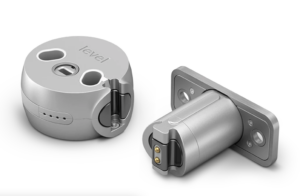
Slipping this technology into your door only requires a basic screwdriver. The secret is a clever motor-in-bolt architecture. The designers managed to shrink the motor and battery so they slide perfectly into the standard one-inch hole already drilled through your door. When installing Level Bolt on existing deadbolt hardware, the entire computer simply vanishes into the wood like a battery sliding into a flashlight.
Keeping your original exterior hardware provides incredible flexibility, especially when retrofitting smart home tech in rental units. Because the outside of your door remains entirely unchanged, you unlock three major daily advantages:
- Landlord compliance: You can keep using your original key, meaning no awkward conversations with property managers about changing the locks.
- Aesthetic consistency: Your door hardware continues to perfectly match your home’s unique style.
- Emergency mechanical override: If the smart lock’s battery ever dies, your old metal key still turns the lock perfectly.
This invisible convenience is fantastic, but it naturally leads to a bigger question about physical safety and durability.
Level Lock
More Than a Pretty Face: Decoding the BHMA Grade 1 Security Rating
Looking at the tiny motor hidden inside the Level lock, you might reasonably wonder if making a gadget smaller also makes it weaker. Fortunately, the hardware industry relies on a universal yardstick for toughness to put those fears to rest. This device earned one of the highest possible scores, securing top-tier BHMA Grade 1 security ratings for smart locks. Think of this grade as the industry’s “Gold Standard” for residential protection, proving the compact metal casing can withstand heavy physical abuse without giving way.
Earning that prestigious badge requires far more than just surviving a single heavy impact at the testing lab. The lock also undergoes brutal cycle testing, where machines automatically extend and retract the deadbolt hundreds of thousands of times. This punishing process guarantees long-term smart lock hardware reliability, ensuring the tiny internal gears will not strip or jam after a few years of letting your family and guests in and out.
While 2026 headlines constantly warn us about invisible digital hackers, the reality is that traditional home break-ins still overwhelmingly rely on brute force. That is exactly why Level engineered their hardware to pair perfectly with heavy-duty strike plate reinforcement. The strike plate is the metal bracket attached to your doorframe, and anchoring it with extra-long screws creates an immovable grip. It essentially turns your front entrance into a physical wall that perfectly matches the lock’s formidable digital encryption.
A fortress-level deadbolt brings incredible peace of mind, especially when you are asleep or away from home on vacation. While impenetrable hardware provides baseline security, daily convenience relies on how seamlessly the lock opens.
Tap and Enter: Why Apple Home Key Is the Real Game Changer for Daily Friction
We have all been there: balancing a heavy bag of groceries in one arm while digging for a metal key in the dark. Early smart locks tried to fix this with Bluetooth auto-unlock, but standing awkwardly on your porch waiting for an app to connect is hardly an upgrade. The Level Lock Plus completely changes this dynamic by introducing Apple Home Key, trading unpredictable wireless signals for the instant reliability of a physical tap.
This instantaneous response is powered by Near Field Communication (NFC), the exact same technology that lets you buy a coffee by tapping your phone at the register. Unlike Bluetooth, which casts a wide and sometimes messy net to find your lock, NFC requires your device to be within an inch of the door. This proximity creates blazing-fast Apple Home Key NFC entry speed, opening your door in less than a second without any annoying loading screens.
The true magic happens when you enable a setting called “Express Mode” inside your Apple Wallet app. Instead of forcing you to use Face ID or type a passcode, this feature keeps your digital key active even if your iPhone or Apple Watch screen is completely black. Saving ten seconds at the door might not sound huge, but skipping that daily friction avoids hours of frustration over a year.
Experiencing this seamless entry process feels remarkably natural, completely eliminating the need to empty your pockets or drop your bags. Here is a step-by-step look at how the NFC trigger process works in everyday life:
- Walk up to your entrance without slowing down to search for keys.
- Hover the top of your iPhone or your Apple Watch over the lock’s keyhole.
- Feel a gentle vibration on your device confirming the scan.
- Hear the deadbolt instantly slide open and walk right inside.
Instant physical entry solves half the equation, but consistent network connectivity prevents digital keys from randomly failing when sharing access remotely.
The 2026 Tech Check: Using Matter and Thread to End ‘Device Not Responding’ Errors
Nothing ruins the magic of a smart home faster than staring at a “Device Not Responding” error on your phone. Older smart locks relied exclusively on standard Bluetooth, meaning your lock could only talk to a hub if it was just a few feet away. Thankfully, the 2026 versions of these locks have finally solved this frustrating connectivity drop.
The foundation of this newfound reliability is the Level Home Matter protocol integration. Think of Matter as a universal translator that lets your lock easily understand commands from Apple, Google, or Amazon systems without picking favorites. Instead of downloading a clunky, brand-specific app, this standard guarantees your hardware works seamlessly with the tools you already use.
Behind the scenes, this communication relies on Thread protocol support for smart home stability. Instead of every gadget fighting for a direct connection to your Wi-Fi router, Thread devices act like a digital bucket brigade. They pass signals to each other to create an invisible “mesh,” meaning a simple smart plug in your hallway actively helps your front door stay connected.
Getting this invisible mesh to talk to the outside world brings up the Level Connect bridge requirements for remote access. If you own an Apple TV or a newer HomePod, you already have the necessary translator—called a Border Router—built into your living room. Otherwise, you must plug the tiny Level bridge into a nearby outlet to check your door while on vacation.
With rock-solid internal technology and stable networking, the next step is evaluating how this invisible approach compares to traditional keypad competitors.
Level Lock Plus vs. Schlage Encode Plus: The 2026 Heavyweight Comparison
When shopping for premium smart security in 2026, the decision almost always comes down to a Level Lock Plus vs. Schlage Encode Plus comparison. Both models offer incredible reliability and work flawlessly with modern smart home setups, but they take completely opposite approaches to design. Your choice ultimately depends on whether you prioritize a hidden tech footprint or the immediate convenience of tapping a code on your door.
Most people are already familiar with the touchpads found on the outside of popular smart locks. The Schlage embraces this design, giving you a physical keypad that is a lifesaver if your phone battery dies or you need to let a dog walker inside without forcing them to download an app. While Level offers a separate wireless keypad you can hide nearby, the lock itself lacks that instant, phone-free entry option right on the handle out of the box.
Physical space on your door presents another major deciding factor, dealing with what builders call form factor constraints. Bulky smart locks with internal computers and external keypads often bump into decorative glass panels, storm doors, or thick custom molding. Because the Level hides its entire brain inside the door itself, it is one of the best invisible smart lock alternatives for tight spaces, fitting effortlessly anywhere a standard deadbolt goes.
Comparing these two models side-by-side reveals their completely different engineering philosophies:
- Size: Level (Standard traditional deadbolt) vs. Schlage (Tall, rectangular, and highly visible).
- Keypad: Level (Wireless accessory sold separately) vs. Schlage (Built-in exterior touchscreen).
- Battery Type: Level (One small battery hidden inside the bolt) vs. Schlage (Four AA batteries in a bulky interior housing).
- Finish Options: Both offer standard matching hardware like Matte Black and Satin Nickel.
Beyond looks, you should also consider the lock’s acoustic signature—a fancy term for how loud the motor sounds when it turns. Schlage packs a larger motor that produces a noticeable, robotic whirring noise that can easily wake a sleeping dog during a late-night arrival. Level’s tiny internal motor operates with a much quieter, subtle click, keeping your household peaceful after hours.
Ultimately, if you want traditional keypad convenience, Schlage wins, but if you want your smart home to remain a secret, Level is the undisputed champion. Achieving that invisible magic requires unique engineering, specifically a specialized battery tucked right into the locking mechanism that demands specific care.
Feeding the Beast: Optimizing CR2 Battery Life and Long-Term Hardware Care
Hiding a computer inside your door means sacrificing standard AA batteries. Instead, Level relies on a small CR2 lithium battery housed directly inside the deadbolt. Because this single battery powers the lock’s brain and motor, adopting a routine “once-a-year” replacement strategy—much like checking your smoke detectors—is highly recommended. This proactive habit ensures you never return home to an unresponsive door.
Winter brings a hidden challenge to this invisible design. Unlike bulky interior smart locks that stay warm inside your hallway, the Level’s battery sits within the metal core of your door. Freezing temperatures turn that metal into a freezer, causing cold-weather drain that visibly shortens battery lifespan. If you endure harsh winters, plan to swap that battery every eight or nine months just to be safe.
The secret to Level Lock CR2 battery life optimization lies in understanding the battery’s unique power curve. Lithium batteries deliver strong, consistent power for months but drop off suddenly at the very end. You won’t hear the motor slowly struggling like a dying toy. Instead, the mechanism will play a specific low-battery chime and eventually refuse to turn the bolt to save enough energy to keep its internal memory active.
Should you completely miss those audio warnings, your front door isn’t permanently sealed shut. Knowing how to use physical keys with smart locks provides an essential fail-safe, as the standard keyhole still turns mechanically without electricity. Leaving those physical keys permanently in a drawer, however, requires mastering the lock’s digital features and auto-unlock capabilities.
Avoiding the ‘Locked Out’ Nightmare: Mastering the Level Home App and Connectivity
We’ve all experienced the frustration of standing on the porch with arms full of groceries, frantically searching for house keys. The Level app solves this daily friction with a feature called Auto-Unlock, which relies on a technology known as “geofencing.” Think of a geofence as an invisible boundary drawn around your neighborhood using your phone’s GPS. When you cross that line returning home, the app quietly wakes up your lock over Bluetooth so the door unlatches the moment you reach the handle.
Sharing access becomes equally effortless once you master digital guest passes. Instead of hiding a spare key under a suspiciously placed plastic rock, you can text a secure, temporary digital key directly to your dog walker or visiting family members. The app lets you restrict these passes to specific days or hours, ensuring service workers can only enter during their scheduled shifts. When their time is up, the pass automatically expires—giving you complete peace of mind without ever tracking down a borrowed key.
Dense housing situations can sometimes confuse GPS boundaries, making auto-unlock reliability for apartment dwellers a common hurdle. If your door stops opening automatically, follow this quick checklist to get things running smoothly again:
- Keep the Level app open in your phone’s background.
- Verify your phone’s location services are set to “Always Allow” for the app.
- Ensure Wi-Fi is enabled on your device to improve location tracking accuracy.
- Widen your app’s home boundary setting to account for concrete building lobbies.
Occasional hiccups happen even with perfect settings, resulting in the dreaded “ghosting” where the lock simply ignores your phone. Before you break out a screwdriver, mastering Level Home app troubleshooting and connectivity starts with a simple “soft reset.” This process, found right in the lock’s settings menu, acts like giving your device a quick nap. It safely reboots the internal software without erasing your digital keys or home Wi-Fi settings, fixing about ninety percent of everyday connection glitches in seconds.
Mastering these digital features transforms a basic piece of metal into a genuinely helpful part of your daily routine. Once the app is dialed in, the hardware practically vanishes into the background, leaving only convenience behind.
The 2026 Verdict: Is the ‘Invisible’ Lock Still the Best Choice for Your Home?
Upgrading a door used to mean accepting a bulky computer on the entryway, but smart home security has evolved to be completely invisible. Weighing a seamless, hidden design against the reality of a premium $300-plus price tag requires looking past the marketing to decide if blending perfectly into your door frame is worth skipping a built-in keypad.
Make your final choice by looking closely at your family’s daily habits. If your household demands instant fingerprint entry, or if your door frequently sticks and requires a hard physical push to close, those are valid dealbreakers. However, if your top priority is preserving your home’s original style while gaining the modern convenience of phone-based entry and guest passes, the investment makes sense. You are paying for longevity and the unmatched physical strength of a BHMA Grade 1 device, ensuring your front door stays secure while running smoothly on stable 2026 connection standards.
Installing a smart lock on a frequently used side door is an excellent way to test this invisible tech in a daily routine before committing to the front entrance. Ultimately, the true measure of success isn’t how many features a company packs into an app, but whether the device gives you complete peace of mind when you walk away from the house. As smart home technology evolves, the most powerful gadgets are the ones that simply disappear into the background, letting you lock up, step out, and get on with your day with absolute confidence.






Leave a Reply
Want to join the discussion?Feel free to contribute!